
Channels, SLAs, and Feedback
Managing SLAs for requests
Service level agreements (SLAs) offer clear expectations and accountability for requests. This way, requesters know how long they have to wait for their request to be addressed and resolved, and service teams can prioritize their workload based on these expectations.
Why SLAs are important
-
Expectation management - SLAs define agreed-upon response and resolution times for different types of requests or incidents. They set clear expectations for employees regarding the timeframes within which their requests will be addressed.
-
Prioritization - SLAs typically assign different priority levels to requests based on their urgency or impact on the business. This allows organizations to prioritize and allocate resources effectively, ensuring that critical requests are addressed first.
-
Performance measurement - SLAs provide a benchmark against which the performance of the request management team can be measured.
Every team can define their SLAs, based on the processes, in their workspace. We’d recommend that you publish these SLAs to your employees so they can tailor their expectations.
Setting up SLAs
-
Go to Settings > Your workspace > SLA.
-
Click on Add policy.
-
Enter a name and description for the SLA policy so your teammates know what the policy is for from the SLA list page.
-
Choose your filters for this policy. Your filter can be any attribute defined by you for a request, service request, or incident. You can also choose a specific value for the attribute (E.g. Requester is Alia Shonda) or a regex pattern like "Department contains Sales" to catch all teams that are in the Sales department.
-
You can chain filters using AND or OR operators.
-
Once you define an SLA, you can choose whether to enable a first response time window and resolution time window or not. This is useful when you have certain requests that are critical but don't require a timer (e.g., legal issues).
When a request is moved to a paused status like Pending, the SLA timer is adjusted to exclude the time the request spends in the paused status. A request in a paused status is only marked as an SLA breach if the SLA was already breached before the pause.
SLAs are calculated based on your business hours. You can configure business hours to match your team’s working days, hours, and time zones.
-
Choose who should be notified, when they should be notified, and based on which timer. You can choose anything from 24 hours before a First Response/Resolution SLA breach to 24 hours after a First Response/Resolution SLA breach.
-
You can set up a notification for any agent or admin in the workspace.
Understanding the SLA status
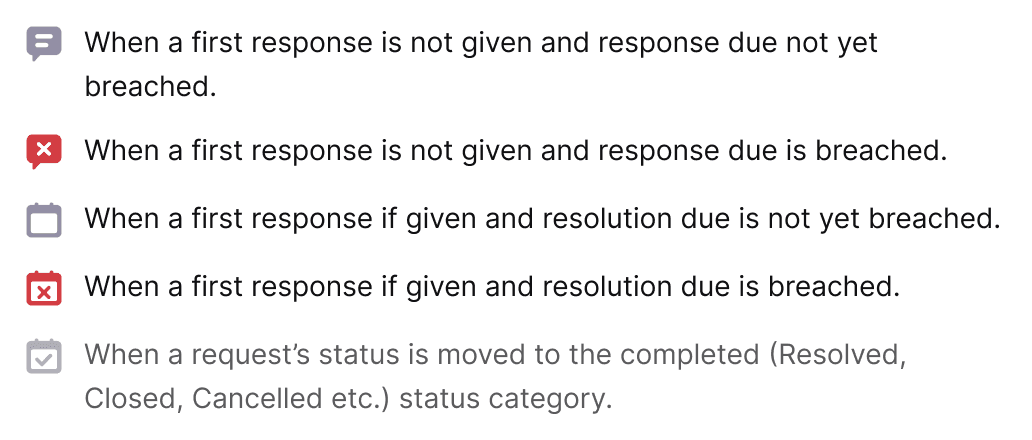
You can quickly understand what the status of the First Response/Resolution SLA is, either on the Request list or Request details page:
Setting business hours
SLAs run only on weekdays during your business hours. This means that due dates and times will be calculated as per your business hours setting. For example, if your business hours are from 9 AM to 5 PM and an urgent priority ticket arrives at 4 PM on a Monday, the due date and time will be 2 PM on Tuesday and not 10 PM on Monday.
-
Go to Settings > Your workspace > SLA.
-
Toggle to** Business Hours.**
-
Choose a start time and an end time to let us know when your workday begins and when it ends.